
How to Block or Stop Spam Calls, Text or Fax in My iPlum Account
1. How does iPlum help protect my business communications?
iPlum is designed for business communications with security and privacy controls that help protect your information. iPlum does not use your business communication content for advertising. iPlum also provides tools and safeguards to help users manage unwanted and spam communications.
2. How spammers usually work for calls, text or fax?
A common trick is to "Spoof" any random phone number in an autodialer and call thousands of users hoping to reach some of them. There are many illegal autodialer applications available online which allow this behavior. The end user gets a "missed call" and when they call back that number, it reaches the real owner of the spoofed number who never placed the call at the first time.
A spammer would randomly configure a number on some 3rd party rogue application and start texting out. For fax numbers they try to detect for fax tones.
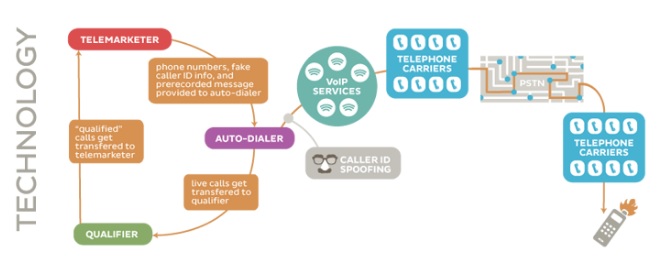
Source: FTC - How does a robocall work?
3. Steps to block spam numbers
Note: When you sign up iPlum number, the first thing you should do is to add that number in the Do-Not-Call list with US Government site. https://www.donotcall.gov/
Block using iPlum Portal
- Login: https://my.iplum.com.
- Dashboard || Users || Click iPlum Login ID of the Line || Settings || Block Numbers (Edit)
Add phone numbers to block incoming calls, text or fax from these numbers.
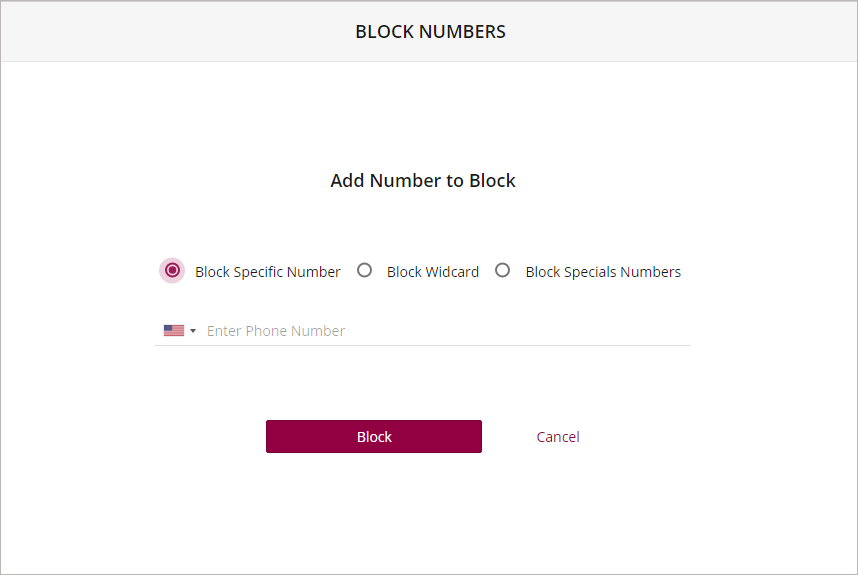
- Wild Card blocking: Enter the first few digits ending with a star (*). This will block any numbers which match that string. Do not enter multiple stars. The star needs to be at the end of the numbers. A simple star after the country icon will block all calls, text or fax from that country. Entering 410* for US will block all numbers starting with area-code 410.
- Special Numbers Blocking: Anonymous and Restricted Caller-ID numbers can be blocked here.
Block using iPlum App
Note: This section is not applicable if you are trying to block a fax number.
- Recents: Tap on the phone number & click Block icon. If the number is already in your contacts, you will see More icon and click on the "Block Number" link in details.
OR
- Settings: iPlum App >> Settings >> Block Number >> Edit.
- Enter the phone number to block.
- (Optional) To add Wild Card blocking: Warning: Choose this option carefully since it will block multiple numbers. Enter the first few digits ending with a star (*). This will block any numbers which match that string. Do not enter multiple stars. The star needs to be at the end of the numbers. A simple star after the country icon will block all calls & texts from that country. Entering 410* for US will block all numbers starting with area-code 410.
4. Steps to unblock numbers
Unblock using iPlum Portal
- Login: https://my.iplum.com.
- Dashboard || Users || Click iPlum Login ID of the Line || Settings || Block Numbers (Edit)
Delete entries you don't want to block
Unblock using iPlum App
Note: This section is not applicable if you are trying to block a fax number.
- iPlum App >> Settings >> Block Number >> Edit.
- Swipe left next to the phone number.
5. Setup Free Phone Tree:
Setup free phone tree for your iPlum number in iPlum portal. Spammers usually have automated dialers. If you have a phone tree setup on your iPlum number, the dialers stop at the Greeting itself since there is no real person to dial an extension and the spam call gets dropped. To find about Auto Attendant click here
6. Change iPlum Number:
If you want to change your iPlum number, you can do it here. There is a one-time $9.99 number change charge.
Helpful links:
%20(1).avif)
.avif)